
Write the email. See how your audience reacts before you send it.
Mailnaptic is an email platform with an AI writer, segments you can describe in plain English, and a rehearsal mode where a sample of your real subscribers react to a draft before it goes out.
Free plan available. Paid plans from $14 a month.
Campaign builder / Rehearse
Rehearsal: 10 subscribers
Predicted opens
41%
+6 pts vs last send
Predicted clicks
5.8%
+1.1 pts
Unsubscribes
0.2%
No change
Frequent buyers
74%
Browsed, never bought
38%
Lapsed 90 days
19%
Lapsed 90 days
Would skim it. A softer first line would bring me back.
Suggested fix: move the button above the fold
Plans from $14 a month
Free plan, no card needed
GDPR, CAN-SPAM, CCPA and CASL tooling
WooCommerce and Shopify store sync
See it in the app
The dashboard
Contact, campaign and domain totals, sending health and an onboarding checklist on one screen.
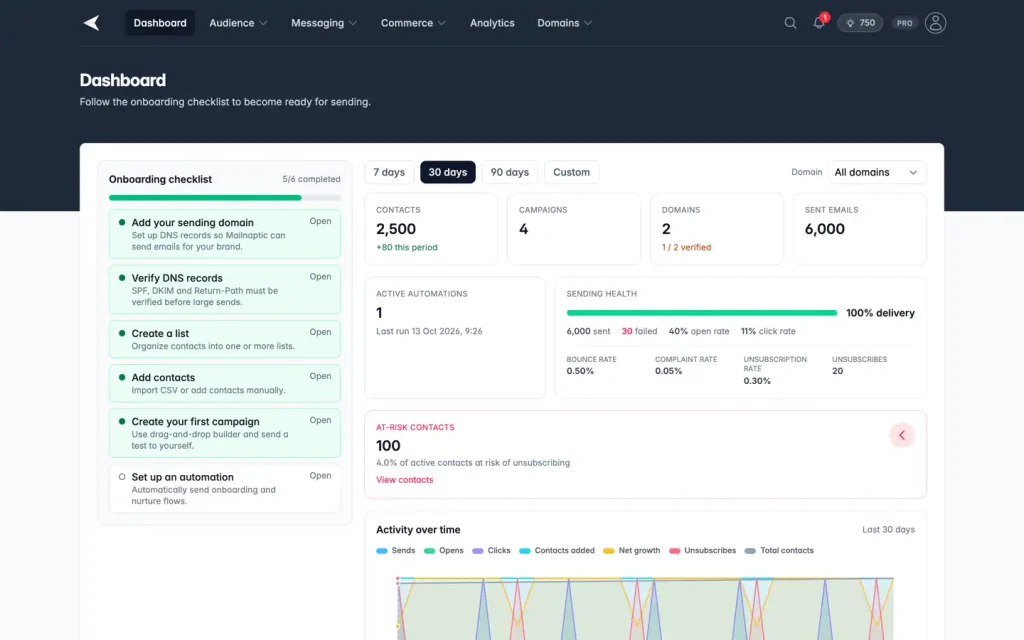
Screenshot with sample data.
Writing
A first draft from a two-line brief
Describe the email and Mailnaptic writes the body, subject lines and preheader. Tone and length are settings. You can rewrite a single block without touching the rest of the layout.
Subject lines get a score out of 100 with suggested alternatives
Rewrite one text block at a time
A tone check before you schedule
AI credits are included in every paid plan
AI writer
Brief
Re-engagement email for subscribers inactive for 90 days. Friendly, about 120 words, 20% off.
Subject lines
We saved your seat
Strong. Short and personal.
84
A little something for coming back
71
Your 20% off expires Friday
Urgency, but similar to your last send
63
Segments / New
Describe your audience
Customers in the US who bought in the last 60 days but have not opened an email in 3 weeks.
Country is US
Purchased in last 60 days
No opens in 21 days
1,284
contacts match
Audience
Segments you can describe out loud
Type the audience as a sentence and the rules are filled in for you, with a live contact count before you save. Or build the rules by hand: engagement, custom fields, tags, lists, purchases and exclusions.
Live contact count while you edit
Exclusions, so a campaign skips people who already bought
Reusable across campaigns and automations
Automations
Flows that react to what people do
Start from a trigger such as a new contact, an abandoned cart or a page visit. Add waits, conditions and A/B splits, and let Mailnaptic draft the flow from a description if you do not want to start from a blank canvas.
Triggers from contacts, lists, web events, orders and webhooks
Branch on tags, fields, opens and clicks
Pick a template or describe the flow
Automation builder
Contact joins list: Newsletter
Trigger
Send: Welcome email
Immediately
Wait 3 days
Opened the welcome email?
Yes: send the guide. No: resend with a new subject.
Add tag: engaged
Campaign / Spring sale
Spring collection
Shop now
Click rate
4.9%
+0.8 pts
Opens, last 7 days
M
T
W
T
F
S
S
Analytics
See which part of the email got clicked
Each campaign gets opens, clicks, devices and a click heatmap drawn over the email itself. Compare two campaigns side by side, or schedule a report to land in your inbox every week. A send time heatmap and an engagement funnel show when to send and where people drop off.
Click heatmap over the real email
Campaign comparison
Scheduled reports by email
An AI write-up after every send
Deliverability
Authentication that is checked for you
Add a sending domain and Mailnaptic shows the exact SPF, DKIM and DMARC records to publish, then checks them. New domains can warm up gradually, and bounces and complaints are suppressed automatically.
SPF, DKIM, DMARC and BIMI guidance
Blacklist checks and feedback loop setup guidance
Google Postmaster Tools dashboard (Pro)
Frequency capping per contact
Domains
mail.example.com
SPF
v=spf1 include:... ~all
Verified
DKIM
selector1._domainkey
Verified
DMARC
Reports to dmarc@example.com
p=quarantine
Blacklists
None found
Warmup
Daily limit 1,600
Level 6
Ecommerce / Attribution
Revenue attribution, last 30 days
Source
Orders
Revenue
Abandoned cart flow
86
$5,420
Welcome series
41
$2,180
Spring sale campaign
63
$3,960
Ecommerce
Connect your store and trace revenue back to the email
The WooCommerce plugin and the Shopify app sync products, orders and abandoned carts. Mailnaptic then credits orders to the campaign or automation that drove them, using a 7-day window for automations.
Abandoned-cart and browse-abandon flows
Segments from order history
Product blocks in the email builder
Growth plan and above
Also included
The rest of the platform
Compliance tools
Consent logging, a preference center, unsubscribe reasons, an audit log (Business) and data-subject requests.
Learn more
API and webhooks
REST API with org-scoped keys, transactional email and webhooks with a delivery log and replay. Growth and up, transactional email Pro and up.
Learn more
Site tracking
Track page views and events on your site and use them as segment rules and automation triggers. Growth and up.
Learn more
Campaigns and templates
Drag-and-drop builder, A/B tests, a campaign calendar and send-time optimization (Pro and up).
Learn more
Newsletter archive
Embed past newsletters on your own website with a widget.
Learn more
Teams and organizations
Invite teammates by email, add read-only viewers, require approval before members send, and switch between organizations. On Business, keep a full audit trail.
Learn more
AI assistants
Connect Claude, ChatGPT, Codex or Cursor with an MCP server. Read only or read and write, and sending always needs your confirmation. Growth and up.
Learn more
Signup forms and popups
Inline forms and popups with double opt-in and consent records, as a script, a WordPress shortcode or a block. Starter and up.
Learn more
Getting started
Set up in an afternoon
01
Add and verify a domain
Publish the DNS records Mailnaptic gives you. Verification runs automatically.
02
Import your contacts
Upload a CSV, connect your store, send them through the API or collect them with a signup form. Map fields once.
03
Send a campaign
Write it, rehearse it, schedule it. Check results the next day.
Pricing
Priced by features and list size
Prices shown are for up to 1,000 contacts. They go up with your list, and you can see every tier on the pricing page.
Starter
$14
/ month
Campaigns, drag-and-drop builder, 5 segments, 1 signup form, 50 AI credits.
Growth
$29
/ month
Unlimited segments, ecommerce, 5 signup forms with popups, no branding, 250 AI credits.
Pro
$49
/ month
Unlimited automation steps, Postmaster, 1,000 AI credits.
Business
$99
/ month
AI deliverability tools, 10 seats, 5,000 AI credits.
FAQ
Questions, answered
Is there a free plan?
Yes. You can start on the free plan without a credit card. Paid plans add more contacts, seats, AI credits and features.
How do AI credits work?
Each paid plan includes a monthly allowance. Writing an email costs 5 credits, subject lines 3 and a natural-language segment 3. Credits reset every month, and Growth, Pro and Business can buy extra packs.
Can I send from more than one domain?
Yes. Each sending domain has its own authentication status, warmup and reputation checks.
What are digital twins?
In the campaign builder you can rehearse a draft with a sample of your subscribers. Mailnaptic simulates how they would respond and suggests changes. It is a prediction, not a guarantee. Rehearsal is available on Pro and Business.
Which store platforms work?
WooCommerce, through the Mailnaptic plugin, and Shopify, through the Mailnaptic app, which is in review with Shopify. BigCommerce is listed as coming soon in the app. Anything else can use the REST API.
From the blog
Guides we wrote for our own customers
Deliverability
How to set up SPF, DKIM and DMARC for a new sending domain
The records, the order to publish them in, and how to tighten DMARC without losing real mail.
8 min read
Campaigns
Nine things to check before you send a campaign
A pre-send checklist, with the place in the campaign builder where each check lives.
7 min read
Ecommerce
A three-email abandoned cart flow, step by step
What to send an hour, a day and three days after a cart is left, and when to stop.
8 min read
Send your first campaign this week
Start on the free plan, verify a domain and add your first contacts.
No credit card required. Free plan available.