
Send from a domain that mailbox providers trust.
Add your sending domain, copy the DNS records Mailnaptic gives you, and watch the checks turn green. After that, warmup, bounce handling and reputation monitoring run without you babysitting them.
Free plan available. No credit card required.
Domains / mail.example.com (sample data)
Health score
82
Healthy
Bounce rate
0.6%
Low
Complaints
0.02%
Low
SPF
Return-path and include record
Verified
DKIM
Selector published
Verified
DMARC
Reports being collected
p=quarantine
BIMI
Needs DMARC quarantine or reject
Not set up
Warmup is running. Volume steps up automatically.
SPF, DKIM, DMARC and BIMI setup in one place
Warmup that starts with your first campaign
Blacklist checks and feedback loop guides
Google Postmaster data on the Pro plan
Authentication
DNS records, checked for you
When you add a domain, Mailnaptic lists every record to create: SPF, DKIM and the return-path MX. It checks DNS live, so you see which record is missing instead of guessing why a send was rejected. A new domain also needs an ownership record, which proves it is yours: a domain is verified when the ownership record, SPF, DKIM and the two return-path records pass.
The MX record goes on the return-path subdomain, not your root domain
DMARC moves in stages: none, then quarantine, then reject
DMARC report monitoring is available on Pro and above
BIMI settings take your SVG logo URL and an optional VMC certificate
Domains / DNS
DNS records to add
Type
Host
Status
TXT
example.com
Verified
TXT
selector._domainkey
Verified
MX
envelope.example.com
Verified
TXT
_dmarc
Pending
DMARC policy
none
quarantine
reject
Domains / Warmup
Warmup level
1
2
3
4
5
6
7
Current level
Level 4
Next level
Higher daily volume
Warmup
Volume goes up in steps, not all at once
A new domain that suddenly mails a whole list looks like spam. Mailnaptic starts warmup with your first campaign and raises your sending volume level by level. Each domain shows its current level, the next level, and what the levels mean.
Health score scales your daily sending limit
A lower score cuts the limit, to a floor of 25% of the level's volume
Each day a domain sends, it moves up one level
Frequency capping limits emails per contact per day and per week
Reputation
Bounces and complaints, where you can see them
The organization page shows complaint and bounce rates for the last 24 hours and the most common bounce reasons for the last 30 days. It warns you as you get close to the limits. If spam complaints pass the limit, sending is locked until you fix the cause.
Settings / Deliverability
Sent (24h)
12,480
Complaint rate
0.03%
Within limit
Bounce rate
0.9%
Within limit
Domain health
82
Healthy
Bounce rate, last 14 days
Top bounce reasons (30d)
Mailbox does not exist
148
Mailbox full
51
Blocked by recipient server
22
Other
19
List protection
Keeping bad addresses out of your sends
Automatic suppression
Hard bounces and spam complaints are suppressed as they happen. The contact stays on file but stops getting email.
Blacklist check
Run a check from the domain page. It looks your domain up on the Spamhaus DBL and reports listed, not listed, or check failed. A failed lookup is never shown as clear.
Feedback loops
Enrollment guides for ISP feedback loops, so complaint reports reach you instead of disappearing.
Inactive contacts
Set a number of days, and contacts who have not opened, clicked or visited your site in that time are suppressed.
Bot click filter
Scanner clicks are recognised automatically: known scanners, data-centre visits, clicks seconds after sending and bursts across every link do not count. Turn on bot click filtering to also hide them from your click reports.
Frequency caps
Pick a maximum per day and per week, so the same person does not get five campaigns in one afternoon.
Domain monitor
Mailnaptic checks your domain's DNS records every 6 hours by default, so a record that breaks is spotted early.
ISP breakdown
See how your mail performs at each mailbox provider. Pro and above.
Suppression list
Search suppressed addresses and remove one if it was added by mistake.
Google Postmaster Tools
What Google reports about your domain
Connect Postmaster with read-only access. Mailnaptic pulls 30 days of traffic stats and plots your user-reported spam rate against Google's thresholds: 0.10% is the warning line, 0.30% is where Google starts enforcing. Available on the Pro plan.
Shows which of your domains are not registered in Postmaster yet
No emails are sent through Google
Disconnect any time and the tokens are revoked
Postmaster
User-reported spam rate
Warning threshold
0.10%
Enforcement threshold
0.30%
Domains / Recovery plan
AI reputation recovery plan
Finding
Complaints cluster in one segment of contacts who have not opened in months.
Suggested
Pause that segment, lower the weekly cap, and re-check DMARC before the next send.
Pause inactive segment
Lower weekly cap
Re-check DMARC
AI deliverability
A written plan when a domain slips
On the Business plan, Mailnaptic can look at a domain with a low health score and write a recovery plan. It also has an inbox placement analysis. Each run uses AI credits: 8 for recovery and 8 for placement analysis.
Compliance review of a campaign before you send costs 8 credits
Brand consistency crawl costs 5 credits
Credits reset monthly
Setup
From new domain to first send
01
Add the domain
Enter the domain, a from name and your mailing address. Mailnaptic shows the DNS records to create.
02
Wait for the checks
Verification runs automatically. Fix any record marked pending, then tighten DMARC when reports look clean.
03
Send, then watch
Warmup starts with your first campaign. Check the health score and bounce reasons after each send.
See it in the app
The domains page
See the SPF, DKIM, return-path and DMARC status for a sending domain, with the DNS records to add.
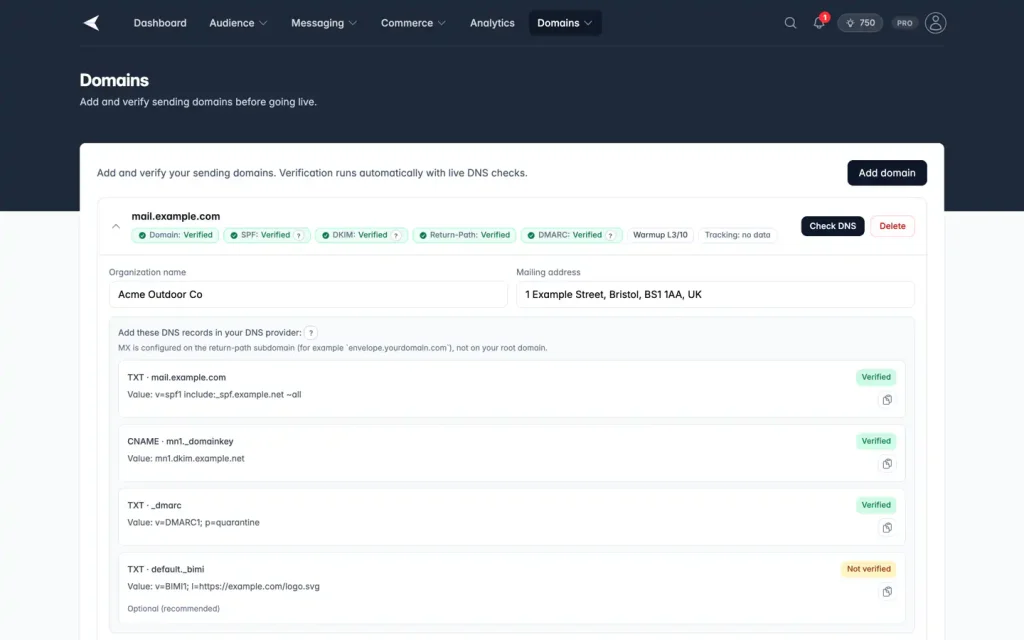
Screenshot with sample data.
FAQ
Questions, answered
Does this guarantee inbox placement?
No. Authentication, warmup and clean lists remove the usual reasons for being filtered, but mailbox providers decide. Mailnaptic shows you the signals and tells you when something looks wrong.
Can I send from several domains?
Yes. Each domain has its own DNS status, warmup level, health score and sender defaults.
Which plan includes the Google Postmaster dashboard?
Pro and above. DMARC report monitoring is also Pro and above. DNS setup, warmup, blacklist checks and automatic suppression have no plan restriction.
What happens to a contact who bounces?
A hard bounce or spam complaint suppresses the contact automatically. You can search the suppression list and remove an address if it was a mistake.
Set up your first sending domain
Set up your domain, import your list and send your first campaign in minutes.
No credit card required. Free plan available.