
Build an audience from what contacts actually do.
A segment is a saved set of rules. Contacts match it while they meet the rules and drop out when they stop, so the audience stays current without any upkeep. Write the rules yourself, or describe the audience in plain English.
Free plan available. No credit card required.
Create segment
Segment name
Engaged, never clicked
Rule logic
AND (must match all rules)
Status
Equals
Active
Opened email (within days)
Greater than
30
Not clicked email (in days)
Greater than
90
Preview
Matching contacts: 1,284
Sample data
AND or OR logic, with a live match count
Profile, tags, lists, custom fields, engagement
Plain-English builder on Pro and above
Exclude segments from a send
AI segment builder
Say who you want, then check the rules
Open a saved segment, click Edit, type a description into the AI box and click AI Build. The rules are filled in below, with a short explanation and the number of matching contacts. You can edit them like any other segment before saving.
Natural-language segments need the Pro plan and cost 3 credits
Nothing is saved until you click save
AI ideas on the Segments page suggest segments from your audience
Create segment
Describe your segment in plain English
Active contacts who opened an email in the last 30 days but never clicked
AI Build
Matches active contacts with a recent open and no clicks. (1,284 matching contacts)
Status
Equals
Active
Opened email (within days)
Greater than
30
Not clicked email (in days)
Greater than
90
Rule types
What you can filter on
Rules are built from a field, a condition and a value. Mix as many as you need.
Profile and status
Email, first name, last name, status and email frequency.
Email engagement
Opened, not opened, clicked, not clicked within a number of days, plus last email activity and engagement score. Automatic opens, such as Apple Mail Privacy Protection, are ignored by default. Growth and above.
Tags and lists
Has tag, does not have tag, in list and not in list.
Time rules
Subscribed N days ago, last seen N days ago, last email activity.
Custom fields
Any custom field you store, such as plan tier. Equals, contains, starts with, ends with, is empty.
Lead and engagement score
Filter on lead score or engagement score. You set the scoring rules, so the number reflects what matters in your business.
Web activity
Pages visited, events recorded by the site tracking snippet, and purchases made on your site. Pro and above, in the rule builder and also through the plain-English builder.
Segment overlap
Open a segment to see how many of its contacts also sit in your other segments, before you send to both.
Purchases
Order count, total spent, days since last order, first-time or repeat buyer, lifecycle stage, RFM segment, product, SKU, category, tag and recent spend. Number rules take equals, greater than, less than, at least or at most; product, SKU, category and tag rules take has purchased or has not purchased. Needs the ecommerce connection.
See ecommerce
The Segments page
Each segment shows its rules and its size
Open Segments to see every saved audience as a card with a plain-language summary of its rules and the current contact count.
Segments
Engaged, never clicked
status equals Active, email_opened greater than 30, email_not_clicked greater than 90
1,284 contacts
Edit
Repeat buyers
commerce_repeat_buyer 2+ orders
612 contacts
Edit
Quiet for 90 days
last_active_days greater than 90
3,940 contacts
Edit
Lookalike segment
Found about 420 lookalike contacts
They share the same lifecycle stage and recent engagement as your repeat buyers.
Matching rules
Opened email (within days)
Greater than
30
Subscribed (days ago)
Greater than
60
Create lookalike segment
Lookalikes
Find more contacts who resemble a segment
Open a segment and click Find lookalike contacts. Mailnaptic analyses what the segment has in common and estimates how many similar contacts sit outside it. If the rules look right, create a new segment from them.
The estimate and an explanation come first
The matching rules are listed before you create anything
In campaigns
Send to one audience, skip another
Segment exclusions are on Pro and above. In the campaign builder choose the lists and segments to send to. Under Exclude segments, tick any that should be skipped. A contact in an excluded segment is removed from the send even if they match a target.
A segment you are targeting cannot also be excluded
Commerce starter segments give store owners a head start
Edit a segment's rules from its page
Audience
Send to
Engaged, never clicked
1,284 contacts
Included
Exclude segments
Recent purchasers
Contacts in these segments will be skipped
Skipped
By plan
Segment limits and AI
Starter, $14/mo
Up to 5 segments, using profile, tag, list and custom field rules.
Growth, $29/mo
Unlimited segments. Adds engagement rules (opens and clicks) and purchase based rules with the ecommerce connection.
Pro, $49/mo
Adds web activity rules in the rule builder, segment exclusions, and segment and audience AI: plain-English segments (which can also use web activity rules), segment ideas, audience insights and AI contact search.
See it in the app
The segment builder
Add rules to define who is in a segment, such as opened an email in the last 30 days and clicked an email in the last 90 days.
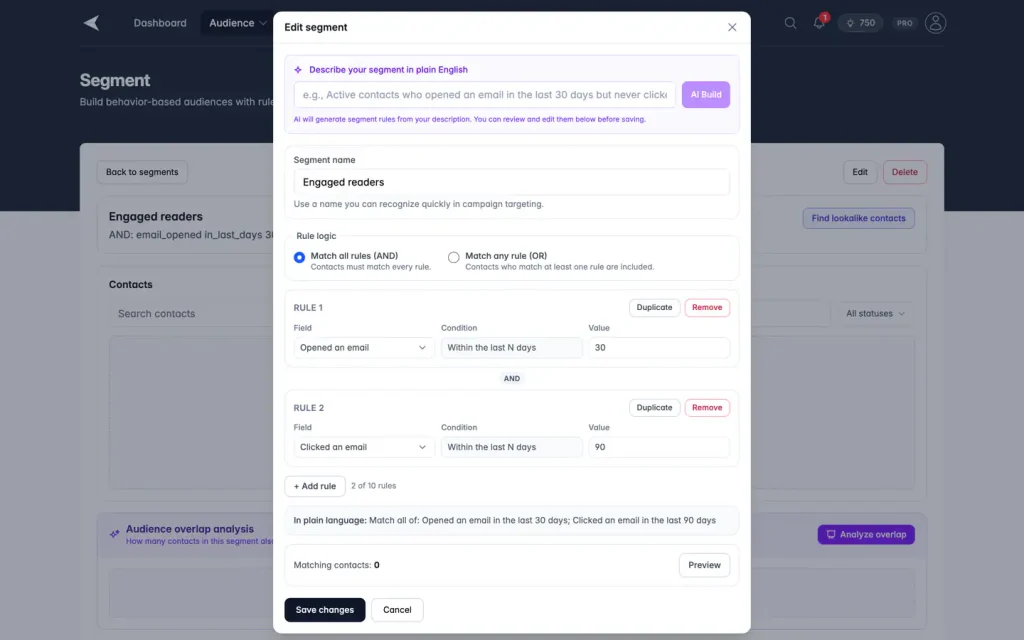
Screenshot with sample data.
FAQ
Questions, answered
What is the difference between a list and a segment?
A list is fixed: a contact is in it because someone added them. A segment is rule based, so contacts come and go as their data changes.
Can I combine rules?
Yes. Add as many rules as you like and choose AND to match all of them or OR to match any.
How many segments can I have?
Starter allows 5. Growth and above have no limit.
Does the AI change my contacts?
No. It only drafts rules from your description. You review them, and a segment only decides who a campaign goes to.
Build your first segment
Create a segment, check the match count and use it on your next campaign.
No credit card required. Free plan available.