
API and webhooks
Build on Mailnaptic with a plain REST API.
Create contacts, manage lists and segments, send campaigns and transactional email, and get a webhook when something happens. JSON in, JSON out, one API key per integration.
The full API and webhooks are on Growth and above.
Terminal
Request
curl $API_BASE/contacts -H "Authorization: Bearer mnpk_your_key_here"
Response, 200
{ "contacts": [...], "pagination": { "total": 1250, "page": 1, "page_size": 50, "total_pages": 25 } }
JSON requests and responses
API keys scoped to one organization
17 outbound webhook events, signed, retried and replayable
Webhook URLs that start automations
An MCP server for Claude, ChatGPT, Codex and Cursor
What the API covers
The same objects you work with in the app
Anything you do by hand in the dashboard has an endpoint behind it. A few of the groups in the reference:
Contacts
Create, update, import, export and merge contacts. A contact import needs "consent_attested": true to confirm you have a legal basis to email the contacts, and unsubscribed or bounced contacts are never added back. Filter the list by status, including status=unsubscribed, and read each contact's suppression_reason to tell an unsubscribe from a bounce. Unsubscribe a contact with POST /contacts/{id}/unsubscribe. Read a contact's activity timeline, or run a GDPR erasure.
Lists and segments
Manage lists, build segments and preview a segment before you save it.
Campaigns
Create, schedule, test-send and send campaigns. Pull stats, people-level stats and the click heatmap.
Automations
Read and manage automations from code, including the ones started by a webhook.
Domains
Add a sending domain, fetch its DNS records, verify them and set a DMARC policy.
Templates
Read and write email templates and reusable blocks.
AI assistants (MCP)
Connect Claude, ChatGPT, Codex or Cursor at api.mailnaptic.com/mcp. Read only or read and write, with sending always confirmed. Growth and above.
API keys
One header, scoped to what the key needs
Create a key in your organization settings. Send it as a Bearer token in the Authorization header, or in x-api-key. A key belongs to the active organization and inherits the role of the person who made it.
Limit a key to scopes such as contacts:write or campaigns:read
The full key is shown once. Mailnaptic stores only a hash.
Revoke a key at any time and it stops working, or give it an expiry of 1 to 730 days when you create it
Failed calls return normal HTTP codes and a JSON error body
Responses carry X-RateLimit-Limit and X-RateLimit-Remaining headers, with limits set per endpoint. A key can also have its own limit of 1 to 6000 requests a minute
Organization settings
API keys
Name
Scopes
Key
Order sync
contacts:write
mnpk_8f2a...
Reporting
campaigns:read
mnpk_41cd...
Admin script
All scopes
mnpk_b07e...
Scopes you can grant
contacts
lists
segments
campaigns
automations
templates
domains
organization
ecommerce
Sample data. Each scope has a read and a write variant, 18 in all.
Request body
POST /transactional/send
{ "to": "ada@example.com", "subject": "Your order has shipped", "html_body": "<p>Your order #1234 is on its way!</p>", "from_name": "Acme Store", "from_domain": "acme.com" }
Response
{ "message": "Email sent", "message_id": "txm_5b1f0c2e-8a52-4c2e-9d0a-3f6d1b7c9e41", "to": "jane@example.com" }
Transactional email
Send a receipt from your own code
POST to /transactional/send with a recipient, a subject and an HTML or text body. The message goes to one person. By default it is sent from your best verified sending domain (highest health score, then warm-up level). To pick another verified domain, pass from_domain. Transactional email counts toward your plan's sending limit and has per-recipient and daily limits. Addresses that complained or hard bounced are never sent to, even with bypass_suppression.
Required fields: to, subject, and html_body or text_body
Optional: from_name, from_domain (a verified sending domain of your organization), reply_to, merge_tags, metadata
You need at least one verified sending domain
Transactional email is on the Pro plan and above
The API key needs the campaigns:write scope
Webhooks: email.delivered, email.bounced and email.complained, with the message_id in data
Outbound webhooks
Know when something happens, and see whether it arrived
Add an endpoint URL, tick the events you want and set a signing secret, or let Mailnaptic generate one. The Test button sends a sample event. The Deliveries view shows each attempt with its status code, and a failed delivery is retried automatically. Only owners and admins can manage webhooks.
Webhooks
Endpoint
https://example.com/webhooks/mailnaptic
Last delivery 200
Active
Subscribed events
contact.created
contact.unsubscribed
contact.updated
campaign.sent
contact.deleted
Sample data. 5 of the 17 events are ticked here. All 17: contact.created, contact.updated, contact.deleted, contact.subscribed, contact.resubscribed, contact.unsubscribed, campaign.sent, campaign.completed, email.delivered, email.opened, email.clicked, email.bounced, email.complained, email.unsubscribed, automation.triggered, automation.completed and form.submitted.
Good to know: email.delivered means the mail relay accepted the message. email.opened and email.clicked cover campaign emails only. email.opened is also sent for automatic opens, and data.open_source says whether the open was human, apple_mpp, gmail_proxy or security_scanner. email.delivered, email.bounced and email.complained are also sent for transactional email, with data.type set to transactional and data.message_id. A bounce or complaint carries the message_id only when the report includes the original message headers. automation.triggered does not fire for bulk scheduled enrollments. form.submitted covers the newsletter archive form and signup forms.
Delivery log
Event
Status
Response
contact.created
200
ok
contact.updated
200
ok
campaign.sent
200
ok
contact.updated
500
Server error, retry queued
contact.created
200
ok
Sample data
Verify a webhook
Payload shape
{ "id": "evt_5b1f0c2e-8a52-4c2e-9d0a-3f6d1b7c9e41", "event": "contact.created", "timestamp": "2026-10-05T09:30:00Z", "organization_id": 42, "data": { ... } }
Check X-Webhook-Signature-V2 (Node)
const timestamp = req.get('X-Webhook-Timestamp') const signature = req.get('X-Webhook-Signature-V2') const expected = crypto .createHmac('sha256', SIGNING_SECRET) .update(`${timestamp}.${rawBody}`) .digest('hex') const fresh = Math.abs(Date.now() / 1000 - Number(timestamp)) < 300 const ok = fresh && expected.length === signature.length && crypto.timingSafeEqual(Buffer.from(expected), Buffer.from(signature))
Signature and headers
Every request has X-Webhook-Id, X-Webhook-Timestamp (Unix seconds) and X-Webhook-Signature-V2, the hex HMAC-SHA256 of the timestamp, a dot and the raw body, so you can reject stale requests. The original X-Webhook-Signature, an HMAC-SHA256 of the raw body alone, is still sent. X-Webhook-Event and X-Webhook-Attempt are included too, with the user agent Mailnaptic-Webhook/1.0.
What counts as delivered
Your endpoint has 10 seconds to answer. Any 2xx response is a success. Anything else, or no answer, is retried: up to 5 attempts in total, about 30 seconds, 5 minutes, 30 minutes and 2 hours after the previous failure. Every attempt is written to the delivery log. The event id is the same on every attempt, so you can deduplicate. To send a past delivery again, owners and admins can replay it from the delivery log: it is one attempt, signed again, and marked with X-Webhook-Replay: true.
Safe by default
Mailnaptic looks up your hostname again before each delivery, refuses private or internal addresses and does not follow redirects.
See it in the app
Webhook deliveries
Each delivery is listed with its status code, and you can open one to see the request body with its event id.
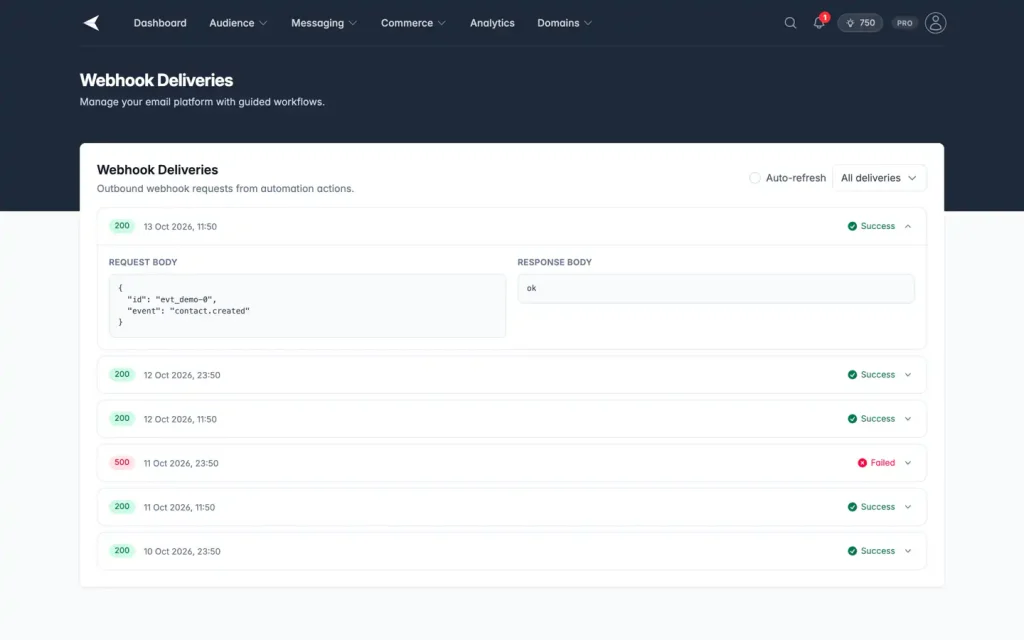
Screenshot with sample data.
Inbound webhooks
Start an automation from your own app
Pick the webhook trigger in the automation builder and Mailnaptic shows a unique URL. POST JSON to it when an order is placed or a trial starts. The fields you send are available in the flow as merge tags.
Reference a field as {{trigger.email}}
Reach nested values with {{trigger.data.orderId}}
Combine with delays, conditions, tags and emails
Automation builder
Flow
Webhook received
POST JSON to this URL
Wait 1 hour
Send email
Subject: Order {{trigger.data.orderId}} received
Add tag: customer
{ "email": "jane@example.com", "data": { "orderId": "1234" } }
Getting started
From nothing to a first call
01
Create a key
Open your organization settings, create an API key and choose its scopes. Copy it then, because it is shown once.
02
Make a request
Send the key as a Bearer token. Every endpoint in the reference has a cURL example you can paste.
03
Add a webhook
Register an endpoint for the events you care about, send a test, and check the delivery log.
Plans
What is included
Based on the pricing page. Check it for the latest limits.
API and webhooks: Growth and above
API keys, the full REST API, and outbound webhook endpoints with signing secret, test events and the delivery log.
See pricing
Transactional email: Pro and above
The /transactional/send endpoint for one-to-one messages from your own code.
See pricing
API reference
Every endpoint, parameter and example, with search.
Open the docs
FAQ
Questions, answered
How do I authenticate?
Create an API key in your organization settings and send it as a Bearer token in the Authorization header, or in the x-api-key header.
Which events can a webhook send?
17 events: contact.created, contact.updated, contact.deleted, contact.subscribed, contact.resubscribed, contact.unsubscribed, campaign.sent, campaign.completed, email.delivered, email.opened, email.clicked, email.bounced, email.complained, email.unsubscribed, automation.triggered, automation.completed and form.submitted. email.opened and email.clicked cover campaign emails only. email.opened is also sent for automatic opens, and data.open_source tells you whether an open was human, apple_mpp, gmail_proxy or security_scanner. email.delivered, email.bounced and email.complained are also sent for transactional email, with data.type set to transactional and the message_id from the send. automation.triggered does not fire for bulk scheduled enrollments. form.submitted covers the newsletter archive form and signup forms. Each delivery is signed and logged.
Which plan do I need?
The full API and webhooks are on Growth and above. Transactional email is on Pro and above. Starter does not include them.
Can I check that a webhook came from Mailnaptic?
Yes. Every request carries X-Webhook-Timestamp and X-Webhook-Signature-V2, the hex HMAC-SHA256 of the timestamp, a dot and the raw request body, made with your endpoint's signing secret. Compute it on the raw bytes, compare, and reject old timestamps. The original X-Webhook-Signature over the raw body alone is still sent. The Test button and the delivery log help while you build the receiver.
Can my app start an automation?
Yes. Use the webhook trigger in the automation builder to get a URL, then POST JSON to it. Fields from the payload are available as {{trigger.key}} merge tags.
How do I avoid handling the same webhook twice?
Every payload has an id that starts with evt_, and the same id is sent in the X-Webhook-Id header. It stays the same across retries and replays, so keep the ids you have handled and skip repeats. Owners and admins can replay a past delivery from the delivery log. A replay keeps the id, is signed again with a fresh timestamp and carries X-Webhook-Replay: true.
Can an API key expire or have its own rate limit?
Yes. When you create a key you can set an expiry of 1 to 730 days and a limit of 1 to 6000 requests a minute. An expired key is rejected like an unknown key, and a key over its own limit gets a 429 response with a Retry-After header. Keys created before this existed never expire and have no per-key limit.
Make your first API call today
Create a free account, generate a key and try the reference examples.
No credit card required. Free plan available.