
Collect signups on your own site, with consent recorded.
Build an inline form or a popup in Mailnaptic, embed it with one script, and every signup lands in the list you choose. Double opt-in is on by default, and each signup stores its consent details.
Signup forms are on Starter and above. Popups are on Growth and above.
Inline form
Sits in your page where you paste it
Starter
Popup
Delay, scroll, exit intent or click
Growth
Double opt-in
Confirmation email before joining the list
On by default
Consent record
Source, text version, IP address and time
Stored
Inline forms and popups
Double opt-in by default
Consent stored with each signup
Shortcode and block for WordPress
See it in the app
The signup form editor
Choose the list and tags, turn on double opt-in, set the fields and consent text, and check a live preview.
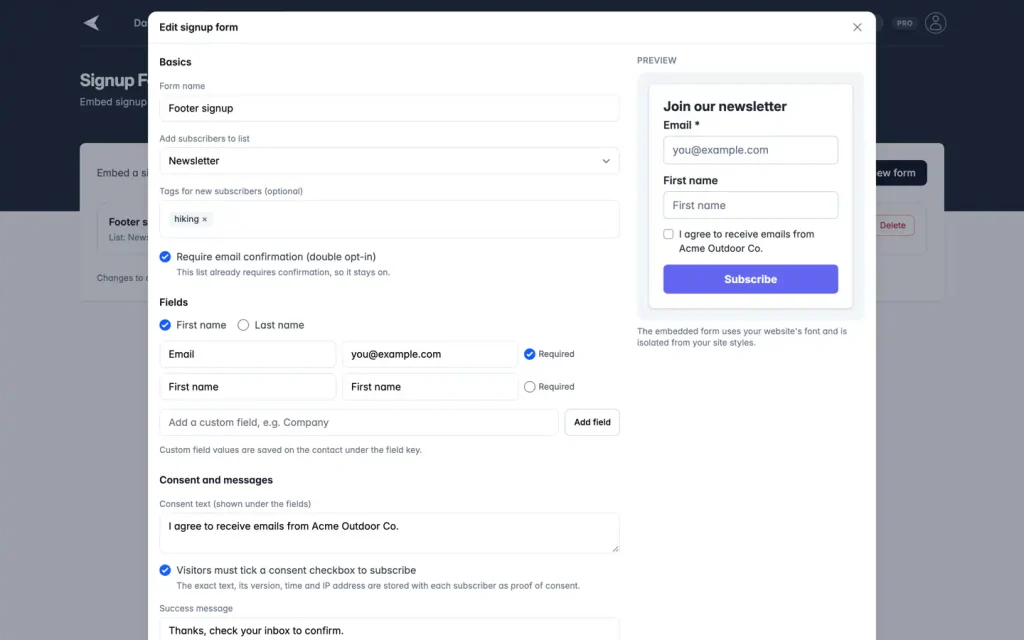
Screenshot with sample data.
How it works
Create, embed, confirm
Open Signup forms under Audience in the Mailnaptic app and go from a blank form to a confirmed subscriber.
1
Create the form
Pick the list, optional tags and your fields. Email is always included, and a form can have up to 10 fields. Write the consent text and style the form with a live preview.
2
Embed it
Copy the embed code. An inline form is a small div plus a script tag, and a popup is a single script tag. On WordPress you can use a shortcode or a block instead.
3
Confirm and collect
New subscribers get a confirmation email and join the list after they click the link. Each attempt shows up in the form's submissions with its status.
The form is drawn in its own container, so your site styles do not change how it looks.
Inline and popup
Put the form where it fits
The same form can sit in a page or open as a popup.
Inline form
Appears where you paste the snippet, for example at the end of a post or in a footer. Inline forms are on Starter and above.
Popup
Choose the trigger: after a delay, after the visitor scrolls a set percentage, on exit intent (desktop), or when they click an element you name with a CSS selector. Pick a centered modal or a bottom corner, how many days before it shows again, and whether it appears on mobile.
Popups are on Growth and above.
Consent
Consent and double opt-in
Each form has its own consent text, and you can require a tick box. New forms ask subscribers to confirm their address, and that stays on when the list requires it.
The consent source, text version, IP address and time are stored with each subscriber
Confirmation emails are limited to 3 per address per hour
Someone who unsubscribed earlier is only subscribed again after they click the confirmation link
Addresses suppressed for a bounce or a spam complaint are not added
Source
Signup form
Recorded
Consent text version
The wording the visitor saw
Recorded
IP address
Stored with the signup
Recorded
Time
Stored with the signup
Recorded
Spam protection
Checks that run behind the form
Every submission is checked before it reaches your list. The checks cut down junk signups. They cannot promise to stop all of them.
Honeypot field
A hidden field that people never see. A submission that fills it in is discarded as spam.
Fill-time check
A signed token records when the form loaded. Submissions that arrive faster than the minimum time are discarded.
Rate limits
Limits apply per visitor address, per form and across all forms, so a burst of requests is turned away.
Email checks
Invalid and disposable email addresses are not added. The visitor sees the same success message every time, so nobody can use the form to find out who is on your list.
You can also list the sites that may show and submit a form. Requests from other sites are refused.
WordPress
Shortcode, block or plain script
Plugin 1.3.0 adds a [mailnaptic_form] shortcode and a Mailnaptic signup form block. They work without WooCommerce and without an API key. On any other site, paste the script from the embed code.
Copy the form ID from the Signup forms page in Mailnaptic
Set mode to inline or popup in the shortcode, or choose it in the block
Popups still need the Growth plan or above
Shortcode, inline
[mailnaptic_form id="YOUR_FORM_ID" mode="inline"]
Shortcode, popup
[mailnaptic_form id="YOUR_FORM_ID" mode="popup"]
Any other site
Plans
Forms by plan
How many forms you can have, and whether popups are included.
Free
Not available
Starter
1 form, inline only
Growth
Up to 5 forms, with popups
Pro
Unlimited forms and popups
Business
Unlimited forms and popups
Deleted forms do not count towards the limit. A paused form still counts.
FAQ
Questions, answered
Which plan do I need for signup forms?
Starter includes 1 inline form. Growth includes up to 5 forms and adds popups. Pro and Business have unlimited forms and popups. The Free plan does not include signup forms.
Do I need WooCommerce to use the WordPress shortcode or block?
No. Plugin 1.3.0 adds the [mailnaptic_form] shortcode and a signup form block, and both work without WooCommerce and without an API key. You only need the form ID from Mailnaptic. On other sites, paste the embed script instead.
Is double opt-in required?
New forms use double opt-in by default: the subscriber gets a confirmation email and joins the list after clicking the link. If the list you chose already requires confirmation, it stays on for the form.
What consent information is stored?
Each signup is stored with the consent source (Signup form), the version of the consent text, the IP address and the time. You can also require a consent tick box on the form.
How do you handle spam signups?
Forms have a hidden honeypot field, a minimum fill time, rate limits per visitor, per form and across forms, and checks for invalid and disposable email addresses. Submissions that look automated are discarded. These checks reduce spam but cannot promise to stop all of it.
What happens if someone who unsubscribed signs up again?
They get a confirmation email and are only subscribed again after clicking the link. Addresses suppressed because of a bounce or a spam complaint are not added.
Do signups trigger webhooks and automations?
Yes. A signup sends the form.submitted webhook, and for a new contact also contact.created and contact.subscribed. Automations that start when a contact is created or joins a list can run.
Add a signup form to your site
Create a form, copy the embed code and start collecting subscribers.
Signup forms are on Starter and above. Popups are on Growth and above.